This is a test.
Headless MacBook Air M2 With Apple Vision Pro As Monitor
If you are into the Apple Vision Pro, you have to check out this YouTube video by Luke Miani.
The Apple Vision Pro can act as a monitor for a Macintosh computer. But then you can’t use the builtin-monitor for the Mac. Luke Miani removed the monitor part of the MacBook Air and then the headless MacBook Air worked using the Apple Vision Pro monitor. At the end of the video, he made a funny fake advertising for the headless MacBook Air. But you know what? I think Apple should make its own headless Macbook Air for the Vision Pro. The Raspberry Pi Foundation several years ago made a keyboard with a Raspberry PI embedded in the keyboard. It is called the Raspberry Pi 400.
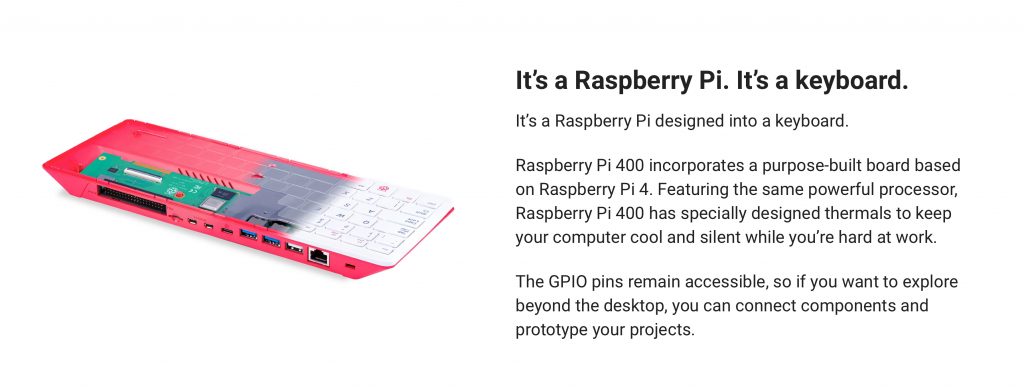
Apple should make a keyboard with a builtin trackpad that also has a Mac built into it. They could easily sell it with the Apple Vision Pro. Great idea Luke Miani!!.
Apple Vision Pro: First Reactions!

Okay, these are my reactions after one day of using the Apple Vision Pros. So my first reaction was, “Wow, this is like amazing.” I mean, anyone who tries it, you feel like you’re in another world, you’re entering another universe, and it’s incredibly cool. Now after I created my account, I created a guest account for my wife and my daughter and my daughter’s friend. They all used it, and all of them had the same reaction, which was, “Wow, this is like unbelievable. This is like amazing.” They felt like they were in a different world.
Now why is that? And I’ll tell you, the thing that’s the most interesting thing about creating a new computer paradigm here with the Apple Vision Pro is that instead of using a mouse or a touch to go through the operating system and get to apps, this operating system uses your eye contact to see what you’re going to click on. And it’s incredible because it tracks your eyes. And so the way you go and navigate through this operating system is you look at an app or a button or something with your eyes, and then you click on it. Now how do you click on it? Now you don’t have to raise your hand and click on anything. Rather, you just click your two fingers together like that. And even though you’re keeping your hand way down near your waist and your Apple Vision goggles are way above it, the cameras on the glasses can see you click.
And why does Apple do it like that? Because remember, years ago, people would complain that, “Why doesn’t Apple with its MacBook Pro or iMac have a touch on the computer?” And that’s because you’d have to raise your hand up and your arm would get tired if you kept raising it. And that’s why with the iPad, you can put it flat, and then when you do touch, you’re not really raising your arm. But they figured out if you raise your arm, it’s going to hurt your arm. So what Apple cleverly did is they figured out how, by putting a lot of cameras on the Apple Vision glasses, using machine learning, they could see when you click your fingers like this, even though it’s way down near your waist or resting on your legs or your lap. And so the beauty of this thing is you navigate around by looking at what you want to click on and then clicking by putting your fingers together. Now here’s the wild thing. Once you get used to this, it feels kind of natural.
And the crazy thing is it’s actually faster than navigating with a mouse on a regular Macintosh or PC because your eyes can move around the screen or what you see much quicker than a mouse can when you’re trying to move it around and click on something on a regular computer. So the weird thing is, once you get used to it, you look at this, you look at that, and you click, you click, and click. Now what’s interesting is, even with putting in my password, a keyboard comes up and I look at a certain letter, click, look at the next letter, click, look at the next letter, click. And once you get used to it, like the passcode on an iPhone, a six-number passcode, I can do that really quickly just by looking at it, going like this, click, click. But remember, the click is down near my waist. I’m not holding it up. And so that part is crazy. It’s a crazy, it’s a new paradigm, right? Because remember, before the Mac came out with the GUI interface and the mouse, regular PCs you just would type. There was no mouse. You would just type on lines. There was nothing virtual like something that looks like a folder.
If you think about it, the GUI, the graphic user interface on a Mac and a PC, that’s a virtual world too because the apps and the folders and the trash can to throw, or a garbage can to throw something away, that’s like a representation of a garbage can. It’s a virtual world. So now what we’re doing with Apple Vision Pro is there’s a virtual world. And so the wow part, that’s like one of the parts of the wow part. The other part is there’s actually like a screen in front of you, this incredibly high definition screen, but because of the cameras like that look through it, it appears pass-through. So you can make it so you don’t see anything, but also you can see the real world. Now it’s not like a 90, it’s not a hundred percent pass-through like regular glass, but it feels like it and it’s close to it. Obviously there’s room for perfection, but apparently this is the best pass-through than anyone’s ever done through such glasses. And the idea is that it’s not completely, you’re not completely shut off that you can see the rest of the world.
Now the really other craziest thing is how 3D is in this thing. Like when I was a kid, we used to get those like glasses, whatever those are, those cards, you could go through and see 3D versions of like, you know, when you were going on vacation somewhere, like what Europe looked like or someplace in other parts of the world. Well this thing is crazy because if you have an iPhone 15 Pro like I do, you were able to take 3D videos for the Vision Pro glasses before they came out. So I took some 3D videos before and I was able to see them in the Vision Pro glasses now. And it’s crazy. It’s like you’re going back into some memory, some like, and reliving some memory, like, and like you’re there. So I had gone up and visited some relatives and I went with them to a store and then like watching the 3D video, it’s like I’m there.
The other thing is, remember like years ago, Apple on the iPhone created panoramic photos? Well I took a whole bunch of panoramic photos years ago when we’re on vacation. Well now when you put these panoramic photos and look at them in the Apple Vision Pro, they’re truly panoramic. They’re truly, the photo now is all around you. And so it’s pretty amazing. So that part’s also amazing. The other part that’s amazing are like watching screens. You know, you can make like a 20 foot movie screen in front of you and it feels like it’s a 20 foot movie screen. So you know, in terms of watching movies, you can, and you can have it all darkened out or have some other like experience surround you. Like you could be on the moon watching a video. You could be in a castle watching a video. And you can make it as big as you want. And also the sound is very good. There’s built in surround sound through it. It’s not plugged into your ear, but it’s right above your ear. And it does a good job of creating this surround sound around you.
But there are these 3D experiences which are just wild. Because like for example, they have this dinosaur experience where like you’re in this 3D world and the dinosaurs come up really close to you. This is the one where actually a butterfly flies in and it lands on your hand. It knows. So the 3D can know where you are and then like react to you. The other thing is there was like a Alicia Keys music video where like you’re in the session with Alicia Keys. You’re like standing next to her as she’s singing and then as her team is playing instruments. And you know, my family, when they tried it in guest mode, they were just blown away. My wife was blown away. My daughter was blown away. Her friend was blown away. This part is truly like a blown away experience. The thing is there’s already like a lot of apps like Microsoft Office is now part of this. But even like Apple’s own like iWork apps like Keynote. Here’s the crazy thing with Keynote. Apple’s got it built in there so that you can practice your Keynote presentation as if you’re in the Steve Jobs auditorium. Now these are all the wow parts, the wow parts of the experience.
Now this is a first generation product just like the first Mac was a first generation product. Just like the first iPhone was a first generation product. And there are limitations here. One is the battery life. So you get this big battery here. I’ll hold it up. This is the battery. You know, it’s like about as big as an iPhone, but thicker than an iPhone. And it basically can run like two and a half, three hours while it’s not charged. But you can charge it like here is it’s charging it. And so you can, it’s a pass through connector so you can like run it just sitting down without losing any power. But you have to have that like, you know, if you’re going away from where you’re plugged in, you have that battery in your pocket. And it weighs a decent amount. You can see that’s why they didn’t put it in the vision glasses.
The other thing is the vision glasses, they are heavy. I mean, this is what they look like. But they’re not, they’re not like really light. And like I have the band, the double band here, because I found that to be more comfortable. But the thing is, like when you wear this, after a while, you get tired. It feels kind of heavy on your nose as it’s resting on the nose. And you can’t like use them, let’s say more than two or three hours. So like you could watch a movie, you could do your work, but after two or three hours, you’re going to get fatigued, because they are kind of heavy. I mean, one thing that I noticed is like, if I lean back, if I’m on a couch and watching a movie, and I lean back, or I’m on my bed, I have a nice bed rest, if I lean back, that takes off some of the pressure, and maybe I can use it longer. So the thing is, they are eventually going to make other iterations of this device, you know, they’re coming up the second version, the third version, look at the iPhone, we’re now on to, I don’t know, 15, 16, 17 versions, actually more, because they had the S version, remember like 5S, 3S, well, we’re probably up to like the 20th. Well, actually, we’ve got to be, the iPhone was created in 2007, we’re in the year 2024. So there’s probably every year, like there’s been a new iPhone. So there’s been maybe 17 iPhones, I think, you know, something like that. But the point is, Apple’s going to iterate on this thing, and it’s going to get better, and better, and better.
The key thing is the operating system, and the technology that creates the 3D world, and the microphones, and the camera, all of that. Apple is going to work on this, it’s going to make it lighter, it’s going to find ways to make the battery last longer, and it’s going to get better and better. And so this, you got to think of this as a new computer paradigm. I mean, you know, like when the mouse came out with the Macintosh, people like John Dvorak said this is a toy, this is ridiculous. He liked the old version of PCs that had come out, you know, just typing characters on the line MS-DOS. And who does that now? Like, you know, other than people using Unix commands on a terminal, most people are using, they’re not even using that, they’re not even using the mouse. Most computer work is done now through touch, through the iPhone, or Android computers, or iPads. But what I’m saying is, this eyeball tracking and clicking thing actually works really well, and it’s really quick. And so I can see eventually this becoming the new paradigm. And who knows, I mean, we might have contact lenses from Apple that have all this technology in it. We may, who knows, Apple maybe could build this contact eye tracking technology into a Mac. Imagine if you could navigate around a Mac without a mouse, but just using cameras to track you and then clicking on apps. And who knows, maybe the iPad will have this eye tracking technology. So it’s pretty amazing.
So overall, I am extremely impressed by this new technology. It’s not cheap. I mean, I got it with like one terabyte, so it’s close to $4,000. But it’s basically a preview of where we’re going, where we’re going in terms of how computers are run, how we use computers. And it is the future. So overall, I give it a big thumbs up.
I’m Getting the Apple Vision Pro Today And Entering An Exciting New Computer Paradigm: The World Will Never Be the Same Again!
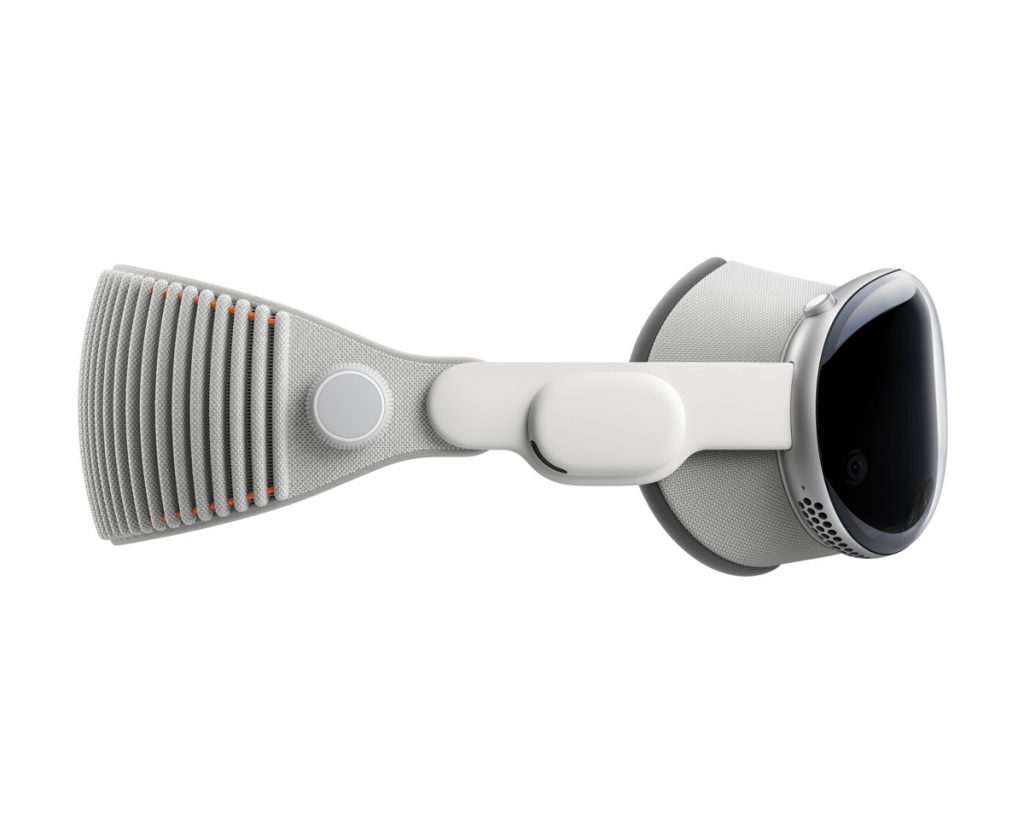
I am very excited. Later today, an Apple Vision Pro will be delivered to me. Yes, I invested around $4,000 to purchase this device. I can afford it because years ago, I invested in Apple (as well as other technology companies like Google, NVDIA, Microsoft, Facebook and Amazon). I totally understand that the Apple Vision Pro will not be perfect. But like in the past when Apple created other devices, it will change how we use computers. And while $4,000 is a lot of money, guess what? For what we are getting, it really is not that expensive. How can I say that? Well, way back in the 1980s my first computer was the Macintosh Plus. In today’s money, that cost around $7,000. The Macintosh Plus back in 1986 had a small black and white screen. But it was totally cool and changed how people use computers. See this wikipedia article. The original Macintosh created a new computer paradigm because it made the graphic user interface and mouse popular. Before this, even the prior Apple computer and MS-Dos computers that IBM and others created just used words typing on a line to control the computer. Now, we take for granted the GUI-based computers. Even Microsoft after the Macintosh was created a GUI operating system: it was Windows!! For years, with Windows PCs and the Macintosh, the GUI computer paradigm using the mouse and keyboard dominated how people used computers. But that paradigm did change. How?
The iPhone. Apple’s IOS system based on touch changed everything. Apple’s iPhone together with the iPad dominate the way people use computers. Look what happened to the stock of Intel. Intel stock is way down because regular computers like Windows PC and Macintosh are not growing like the way smartphones and iPads are. Touch has taken over as the better computer paradigm than GUI with mouse and keyboard. Touch computing is why Apple is worth three trillion dollars.
But now we are entering a new paradigm: spatial computing. With the Apple Vision Pro, and its new spatial operating system, Apple has created a 3 dimensional operating system. We live in a 3D world. Yet up to now, we have been operating computers in a 2 dimensional world. (Arguably, prior to the GUI and mouse, the computer paradigm was just 1 dimensional. For example, computers worked with punch cards or with MS-Dos, with words typed on a line.)
Spatial computing is what Apple has created with the Apple Vision Pro. Yes, other tech companies, including Google and Facebook, have created devices already that look like spacial computing. But what Apple does, based on creating devices and programming and operating systems, is take such technology to another level that will make all people go forward in the new paradigm. Remember, the GUI that Apple created in the Macintosh was actually created previously by a Xerox lab. Apple, under Steve Jobs, saw what Xerox created, and then used it to create the new computer paradigm. What Apple is good at is taking cutting edge technology and figuring out how to make it great and easy enough for everyday people to use. Remember the iPod? Before the iPod there were several good MP3 devices. But Apple took that technology and made it much better with the iPod. It was much better because it had much more storage with a 5 gb small hard drive. Then it became much better by working with the iTunes program to easily buy sons and load it on the iPad. Similarly, the concept of smart phones that were also computers existed before the iPhone. Remember early Windows phones in the early 2000s? They weren’t good. They weren’t good because Microsoft didn’t really make devices and also Windows was made for regular PCs, not really smartphones. When Steve Jobs introduced the iPhone in 2007 he created a new paradigm for all people who wanted to use a computer: touch.
Some people are skeptical. It is understandable. Many people thought the Macintosh would fail. That using a mouse and GUI was stupid and for little kids. Similarly, when the iPhone came out some telephone company executives said it would fail. They said it was too expensive. Remember the RIM guys who created the Blackberry? The Blackberry was the dominant smartphone at the time with a real physical keyboard. Those founders of RIM said the iPhone would never replace Blackberries because a touch keyboard could not replace a physical keyboard. Look how popular the iPhone and Android phones are now. And RIM no longer exists.
So yes, for many, the first model of the Apple Vision Pro is too expensive and also not perfected enough. But the 1st generation of the Apple Vision Pro is the future just like the Macintosh was, just like the iPod was, and just like the iPhone is.
Top Ten Shortcuts For Apple’s Shortcut App.
If you’re an Apple user, you’re probably already familiar with the convenience and efficiency that comes with using keyboard shortcuts. But did you know that there’s an entire app dedicated to creating custom shortcuts for all your frequently used actions and tasks? It’s called the “Shortcuts” app, and it’s a game changer.
Here are my top ten favorite shortcuts available in the Shortcuts app:
1. “Travel ETA” for quickly texting your estimated time of arrival to a friend or family member. This shortcut uses your location and traffic data to calculate your ETA and sends it in a text message with just a tap.
2. “Heading Home” for automating your commute home. With this shortcut, you can set up a series of actions to be triggered when you leave work, such as turning on your house lights, setting your thermostat, and sending a text message to your spouse.
3. “Order Takeout” for quickly placing an order at your favorite restaurant. This shortcut allows you to select your preferred restaurant, menu items, and delivery or pickup options, all with just a few taps.
4. “Create Event” for quickly adding an event to your calendar. This shortcut allows you to specify the details of your event, such as the name, location, and duration, and automatically adds it to your calendar.
5. “Add to Reading List” for quickly saving articles to read later. This shortcut allows you to add a webpage to your Reading List with just a tap, making it easy to save articles or websites for later.
6. “Send Message” for quickly sending a pre-written message to a contact. This shortcut allows you to create and save a message template, and send it to a chosen contact with just a few taps.
7. “Create Note” for quickly adding a note to your Notes app. This shortcut allows you to specify the details of your note, such as the title and body, and automatically adds it to your Notes app.
8. “Search YouTube” for quickly searching YouTube for a specific video. This shortcut allows you to specify your search term and opens the results in the YouTube app.
9. “Create Reminder” for quickly adding a reminder to your Reminders app. This shortcut allows you to specify the details of your reminder, such as the name and due date, and automatically adds it to your Reminders app.
10. “Play Podcast” for quickly playing a specific podcast episode. This shortcut allows you to specify the podcast and episode you want to play and opens it in the Podcasts app.
The “Shortcuts” app is a powerful tool that allows you to automate and streamline all your frequently used actions and tasks. Give it a try and see just how much time and effort you can save with these handy shortcuts!
Top Ten Obama-like iOS Tips!
As a proud owner of an iPhone myself, I often find myself marveling at the endless possibilities and features that come with my beloved device. But with great power comes great responsibility, and as any iOS user knows, there are a multitude of tips and tricks that can help you get the most out of your iPhone.
Without further ado, here are my top ten iOS tips, spoken with the rhetorical flourishes of a certain former president:
1. “Yes we can” save battery life by going to the “low power mode” in your settings. This handy feature helps conserve battery when it’s running low, so you can keep your phone running smoothly throughout the day.
2. “Change will not come if we wait for some other person or some other time” – so take control of your notifications by customizing them in the settings app. This way, you can choose which apps are allowed to send you notifications and which ones aren’t, giving you greater control over your phone’s alerts.
3. “The future rewards those who press on” – so keep pressing on with your updates! Keeping your phone up to date with the latest software ensures that you have access to all the newest features and security patches.
4. “We must be a source of hope” – and with the “find my” app, you can rest easy knowing that you have the ability to locate your lost or stolen phone.
5. “We can’t stop living our lives because of the worst-case scenario” – but with the “emergency SOS” feature, you can feel secure knowing that you have a quick and easy way to call for help in case of an emergency.
6. “The only thing we have to fear is fear itself” – and with the “screen time” feature, you can conquer your fear of phone addiction by setting limits on how much time you spend on your phone and which apps you use the most.
7. “Fidelity to our founding principles requires new responses to new challenges” – and with the “dark mode” feature, you can save your eyes from strain and reduce your phone’s energy consumption.
8. “We are not a collection of red states and blue states; we are the United States” – and with the “unified inbox” feature, you can unite all your email accounts in one place, making it easier to stay organized and on top of your communication.
9. “The best and brightest are not confined by geography” – and with the “continuity” feature, you can seamlessly switch between your iPhone, iPad, and Mac, making it easier to work on the go.
10. “We cannot solve our problems by laying blame at the feet of others” – and with the “offload unused apps” feature, you can take responsibility for the apps that are taking up space on your phone and free up some much-needed storage.
I hope these iOS tips help you get the most out of your iPhone and make your experience with your device even more enjoyable. Go forth and conquer, my fellow iOS users!
Apple Will Continue to Grow in the Office
2021 has almost come to an end and I realize I haven’t written any post to my website this year. So here goes
Apple is a behmoth. It has a market value of nearly $3 Trillion. Amazing. The most valuable company in the world. I remember way beack in the last 1990s when Apple was hanging by a thread. About to go bankrupt. Things looked glum.
Now, Apple is so massive and so successful I feel that governments and other companies are afraid of Apple and now going after it as a “monopoly.”
I feel that Apple can still grow. For example, while many people in the U.S. have an iPhone, maybe 50% or so, not many people have a Macintosh. Nor do the majority of the people have an iPad. In most offices most businesses ae still using Microsoft Windows. The strange things is that most businesses are using iPhones for their employees as Microsoft missed the boat on smartphones. Many businesses are using iPads.
I think going forward, more businesses will drop using Windows computers and switch to devices that are iOS or MacOS. iOS devices, particulary iPads, or now so powerful that most people working in an office can use an iPad to get work done. The iPad is actually better to use than an Windows computer because 1) the iPad makes less noise, and 2) the battery life of an iPad last much longer than any Windows computer. But now, the Macs, with the M1 chips that are similar to the chips that the iPhone and iPad uses, are also really quiet and have batteries that last much much longer than any Windows computer. This is a game changer. When the people in offices realize how quiet and battery life Apple’s devices have, they will want to switch to Apple. Its a better experience.
But what about Windows? Well the thing is, Microsoft realizes that the life of Windows is coming to an end, so Microsoft if moving to the cloud. You can get Windows 365 on the cloud. More importantly, during the pandemic, many office workers accessed their Windows network virtually over vpn. I did so through my 27 inch iMac and the experience was good. As the internet gets faster and as office networks get faster, officer workers will wont care what device they are using as long as they can easily access there office network through vpn. Because Apple’s processors are so better than Intels in terms of not giving off heat and being powerful, workers will seek to switch to having such device.
Bottom line, I think Apple will continue to grow in the office space because its devices are better experiences for workers.
With the M1 Processor, Apple Will Further Dominate Computing, Including Enterprise and the Cloud
I am excited about Apple’s new M1 processor for its Macintosh Computers. I am excited about them even though this past late summer I purchased the 27-inch 2020 iMac for over $4k which has Intel processors. This iMac may be the last Intel computer that I ever purchase. That is because Apple’s M1 Processor is totalling kicking the ass of Intel’s processors. The M1 processor is currently in Apple’s newest MacBookAir, 13-inch Macbook Pro and Mac Mini. And from what people who purchased it are saying those Macs are as powerfull as the latest 16-inch Macbook Pros and iMac Pros. Crazy stuff. They probably already compete with my 2020 27-inch iMac which I loaded up with the i9 intel processors and best AMD video card and 128 GB memory. Crazy powerful. That is until Apple created the M1 processor based on the amazing processor chips in the iPhone and IPad.
The computer world, particularly Intel and those who rely on Intel should be shaking in their boots. Apple’s M1 processor uses less electricity and gives off less heat than Intel’s processor while being even more powerful. That spells big trouble if not death for Intel and those who rely on it.
During the pandemic, I have been using various computing devices at home. My work computer, which work has given me, is a relatively new HP laptop that has i7 Intel processors in it and anS SD drive plus about 16 gb memory. This is a pretty powerful computer given that I mainly use it for Microsoft Word, Adobe Acrobat, browsers and Microsoft Word. But I hate it. I hate it because it is constantly using the fan because it gets really hot underneath. It is noisey and hot. Plus, I have to pretty much always keep it plugged in for power because the battery doesn’t last long — at most, 2 hours.
With the new M1 Processor that uses less electricty, the Macbook Air gets 18 hours without a charge and the 13-inch Macbook Pro gets 20 hours. The Macbook Air makes no noise as it doesn’t have to use a fan. The 13-inch Macbook Pro has a fan but it hardly ever kicks in. People in enterprise are going to be purchasing these M1 computers that Apple makes because they are quiet, give off no heat and have batteries that last very long as well as being very powerful.
This will break the Windows-Intel hold on computers in the work place. For decades, Microsoft and Intel held a monopoly on computers in the work place. Apple Macintoshes had at most a modest slice of that business, maybe 3% or 5% at best. But that grip is going to be smashed by Apple. The time is ripe as Microsoft sees the writing on the wall particulary as Apple dominates smartphones and tablets with the iPhone and iPad. In enterprise, most businesses use iPhones and iPads. Microsoft completely supports Apple’s devices. Microsoft is now going to the cloud for its business. Office 365 is in the cloud. So Enterprise has aleady been used to dealing with Apple devices, i.e. iPhones and iPads. With the Macs now using the M1 processors, Enterprise will probably start switching to Macintosh computers. Afterall, the Macs work well now with the iPhone and iPad. Among other things, the millions of apps on iPhones and iPads will now work on the M1 Macs. For enterprise, it will be easier to support Macs with M1 when they are already supporting iPhones and iPads rather then continuing to support Intel laptops. In addition, since the future of Intel is in doubt now, enterprise will probably rely on Apple, the most successful company in the United States.
These M1 chips growth will not stop in the enterprise. They will also grow and domominate in the cloud. Right now, Intel processors dominate the servers that run the web and the cloud. But the problem for Intel is that Apple’s M1 processors are much more efficient in terms of power versus electricty consumption compared to Intel processors. Anyone running a lot of servers will be compelled to purchase the more powerful and power efficient M1 processors from Apple. Apple sells MacMinis with the M1 processor for under $700. Look for these MacMinis ending up being used as servers.
Epic Games Antitrust Case Against Apple Will Fail
Here is a video I made explaining why Epic Games recent federal court Antitrust case against Apple in the Northern District of California will fail. Check it out.
Here is what I state in the video.
Okay, so here’s the thing a couple of days ago, Epic Games sues Apple, and it seeks declaratory injunctive relief in federal court in the Northern District of California. And what my YouTube video is about is how this claim by Epic Games is not really an antitrust violation. There’s really no basis for this. And if you understand what antitrust is all about, you’ll see why this doesn’t make sense.
Now, here’s the thing with antitrust. So antitrust is when a company has a monopoly in a market and it takes that monopoly in the market and uses that to destroy some other market or to destroy some other entity that is trying to compete. And that’s what antitrust is all about. This goes back to the Sherman act way back at the beginning of the 20th century.
So Fortnite — that’s the game that Epic Games is famous for. So they released Fortnite which is the shoot ’em up game, multiplayer game and actually had it’s probably its greatest success on the iPhone. And what Epic Games is claiming is that it’s unfair for Apple to take 30% from selling the game in the App Store. So Epic Games is basically trying to get a court to say it’s illegal for Apple to charge 30% to any app that is being sold through the app store or 30% of the services. Also, what’s going on is Epic Games is trying to claim that Court should then tell Apple that they have to allow other stores to enter to sell apps on the iPhone. And they’re claiming that, you know, Apple has a monopoly over the iPhone.
Okay, let’s think about this. What does that mean? First you have to establish what is the relevant market? And does a company have a monopoly power in a relevant market? Right, but the key is what is the relevant market? Right. And monopoly power historically had been, you got to be significantly over 50% usually 60%, 70%, 80% or maybe 90%, dominating the market. Okay.
So what are things that are typically monopoly power? Well, your local electricity company like the one where I live in New York City: Con Edison provides electricity. The relevant market for electricity is New York City because I can’t really buy electricity from California. That is because Con Edison owns the wire lines, and I have to get it through Con Edison in New York. Now, the government regulates Con Edison, because otherwise Con Edison could just raise the price a lot. And we don’t have any real choice.
The fact that a company created a product doesn’t mean that it has a monopoly in the market. That wouldn’t make sense, right? Think about it. Does Nintendo have a monopoly power? Because it makes the Nintendo Switch or other Nintendo devices? No, because the market isn’t just Nintendo’s switch. Similarly, Microsoft doesn’t have a monopoly power because it has the Xbox because, you know, yes, it controls the Xbox. But the Xbox competes with other things. So Microsoft doesn’t have monopoly power over the relevant market.
So you have to figure out what is the relevant market. And one way economists historically have tested monopoly power is to do an analysis of, could the monopolist significantly raise prices, and its customers couldn’t leave, there is no place to go. So for example, we need electricity, where we live in New York City. Now Con Ed, if it wasn’t regulated by the government, they could raise the power and maybe some people couldn’t afford it and would have to shut off the electricity. But a lot of people would have no choice and would have to pay much higher electricity. And there’s really no other product that they could get in New York City. We don’t have fireplaces for heating up and it’s not really practical to use candles for light That would be an entity that would clearly have monopoly power.
Buried in Fortnite’s complaint against Apple — I’m reading it, it’s, well, it’s on the web, you can find it, I found it at unrealengine.com. But if you look in the complaint, a lot of it is how users don’t have choices. And it sort of puts down the quality of the App Store. Let me let me take some of the arguments one by one. Here’s the key thing. If you go to Section three, paragraphs 156 157 and 158. These are the paragraphs that are alleging that, you know, trying to convince the court why just the iPhone is the market. The Complaint alleges this heading entitled Competition In The Sale of Mobile Devices Cannot Discipline Apple’s Conduct in the iOS distribution, or iOS in an app payment Process market. So basically, it’s saying Apple’s mobile device customers face substantial switching costs and iOS lock in. So that’s one argument that they make. The second argument is that Apple’s sticky iOS ecosystem protects its dominance in the sales of mobile devices. And then the third point they make is information costs and other market inefficiencies in iOS, iOS distribution iOS in that payment process market.
So basically what they’re saying to the court is people who are iPhone users can’t switch can’t switch away from the iPhone can’t switch away from Apple’s devices, because they’re locked in and you know, they’re locked in because they have a lot of devices. They can’t switch. Now, I think this argument is ridiculous stretch and is kind of crazy. Okay, let’s take the situation with Fortnite.
First of all, I think most people would agree Fortnite the game is played by kids, a lot of teenagers, young kids, maybe even under 10 a lot of teenagers and maybe young adults. These kids are if they’re really passionate fortnight fans, they’re going to lobby their parents for an Android device. Now here’s the thing, Google kicked out Fortnite from the Google Store and Android, but Android allows you to side load apps and also Samsung has its own store and Fortnite is in the Samsung store. So, if you want to play Fortnite on a smartphone, you don’t have to stay with Apple, you can switch to Samsung phones and to other Android phones and get them on your device. This isn’t like the electric company, the electric company can raise the price a lot if its not regulated. There’s nowhere for me to go.
If I really want to use Fortnite and it’s not offered on the App Store for Apple, I can switch to an Android device and Android devices can be very cheap. And I can use it that way. So even now their complaint goes on at length trying to make arguments about how that’s impossible. Let’s take the first argument Apple’s mobile device customers face substantial switching costs and iOS locking. This is what Fortnite’s attorneys, a major law firm, is trying to argue:
So it’s Apple’s power and iOS app distribution market. And iOS in app payment processing markets is not constrained by competition in the sale of mobile devices, because Apple’s mobile device customers face high switching costs in are locked in to Apple’s ecosystem for at least six reasons. These costs make it more difficult for users to purchase a mobile device from a competitor after having committed to Apple’s mobile devices, thereby bolstering Apple’s market power.
So they’re basically saying again, that it’s very high switching costs. Now, I don’t think that’s the case. Okay. First of all, most people anyways after a couple of years, or if not every year, are upgrading their smartphone. It’s ike in some ways these smartphones are accessible luxuries that even people who are economically challenged go for, as well as middle class and upper class people. I remember years ago, I used to stand in line for the Apple store, you know, when that was a thing here in New York City and across the country. And I gotta tell you, it seemed to me there are a lot of people who were economically challenged, who are waiting for the 500 or $600 or $700 iPhone, and for good reason, because these devices are an incredible Information and Communication deal for people.
A lot of people who didn’t have a regular computer can afford a smartphone and particularly the iPhone. And even today, I think a lot of people upgrade every year or every other year or maybe every three years. But the thing is they have it’s not that expensive. The cell phone carriers are still doing these promotions where you get a free phone if you switch. So if you really wanted to switch, you could switch carriers and get a subsidized practically free Android or iPhone. T Mobile has these deals. So I’m not sure what switching costs now, in terms of the apps.
Well, one of the things this complaint doesn’t point out, you know, and what’s interesting that complaint at some point tries to compare the iPhone to the Apple’s Macintosh. And you know, the current Macs and long history of Mac’s Apple has an app store but also Apple allows people to download programs for the Mac from, from the web, or from alternative stores. Epic Games is saying that’s the way it should be. But here’s the thing for consumers. Apple’s App Store on iOS, which is exclusive has been better for consumers. Then this open system on the Mac, and the open system that was on Windows PC. And the best evidence of that is, look how cheap the programs are on the iPhone, compared to programs on the Mac. Programs on the Mac are much more expensive. You typically pay $10, $20, $30, maybe even $100. Well, you know, on the on iPhone, the biggest complaint has been a sort of, you know, the prices of apps keep going down and down and down and down. And developers can’t really charge that much money for an app like you can’t really, you never see somebody selling an app really for 100 bucks or 50 bucks on the iPhone. Instead, there’s a lot of free apps or $5 apps or a $10 app. And maybe if there was a really great you know, professional app Like, like ferrite, you know, that people use to edit audio and podcasts, you know, that might be $15. But if anything, these apps are really cheap. And, you know, I don’t use Android devices. But my sense is that the Android counterparts to a lot of these apps are also cheap. And don’t cost much. So if I wanted to, you know, if I really wanted if I was really into gaming, and you know, Epic Games basically says in its complaint that it wants to create, like its own store, on iPhone and sell other apps directly to people. Well, let’s say if they couldn’t do that. And they did that on Android, and I really loved Epic Games. I could easily switch. And I think a lot of people could just buy another Android device. It’s not that expensive to to play these games.
Let’s look at Section B in the complaint where Fortnite alleges that: Apple sticky iOS echo system protects its dominance in the sales of mobile devices. This is kind of a rehash of the other one, but it says Apple’s ability to raise customer switching costs creates customer lock into its ecosystem. iOS ecosystem is reflected in Apple’s ability to maintain its dominance in the sale of premium smartphones as well as in the sale of tablets. First, Apple’s iPhone dominates sales of premium smartphones. In 2019 alone, Apple’s global iPhone sales generated more than $150 2 billion in revenues. And in the first quarter of 2020, Apple was able to capture 60% of global premium smartphone revenue. Okay, so then it goes on to say that Apple maintains substantial operating profits ranging from 62 to 90%. And it goes on to say Apple has also been able to maintain its pricing power over many years. It’s then it’s then it sort of segues into that. But to say the high switching costs are obvious from empirical evidence. According to 2017 survey by Morgan Stanley 92% of iPhone users intending to upgrade with the next year indicate they would stick to an iOS device.
But wait a second, this evidence is not evidence of high switching costs. See, this logic doesn’t make sense. This is a survey that says a lot of iPhone users tend to stick to iOS devices and upgrade to a new one. And and then they’re arguing that’s a switching cost. It’s not a switching costs. People are happy with iOS devices. Apple makes a premium product. And the irony is the reason that Apple is making a premium product is because it curates the App Store and prevents crappy apps from coming in there. The curating prevents third party apps from over your device and hijacking it. Now what do I mean by that? Okay, now the Mac. And just like the PC for years was around before the iPhone, right? But the Mac just like the PC was susceptible to malware taking over your PC or Macintosh.
And even recently, you know, my teenage daughter I gave her gave her and my son 13-inch MacBook Pros a couple years ago. And my daughter, you know, who probably learned when she was younger how to use an iPhone before she used the Mac. She was clicking stuff on the internet with her MacBook Pro. And I’m telling you, malware got into her to her MacBook Pro, because she clicked on the wrong thing. And next thing you know, both browsers, both Chrome and Safari. were sort of hijacked by this fake Google thing that made it look like you were using Google. But you weren’t using Google, you were using some third party unrelated to Google hijacking your browser to think that it was using Google when it was using its own stupid malware.
This argument in the complaint that because so many people want to stick to the iPhone, there’s high switching costs, there’s no basis to say people are sticking with the iPhone because they don’t have a choice. This is kind of a logical if you think about it, right? What they’re trying to argue is, people don’t want to stay with the iPhone, but they’re forced to stay with the iPhone. But how are they forced to stay with it? Apple’s coming out every year with expensive iPhones for a premium and people they’re not getting the deal. No one’s giving like if there was a subsidy, right? What if If you could like somehow, you know, turn in your iPhone and get a huge subsidy for the more expensive iPhone, that’s why you would stay for it. That would be cheaper than buying an Android. But that’s not the case.
For iPhone users, they can now go to Android. You could go out right now and get a much cheaper Android device that will do a lot of the basic stuff that an iPhone does, right? But a lot of people are finding that it benefits consumers to use an iPhone, right? And how does it benefit the consumer? it benefits the consumer because Apple is investing a lot of its profits into creating better processors. So you get a much more powerful processor for your bang for your buck with an iPhone than you do with an Android device. I mean, now that’s well documented. I don’t know if the average consumer knows that. But the other thing is Apple does a really good job with the camera but then look the Google does with its with its camera, the Google phones right that are androids.
So what is it? I mean, the other thing that they don’t really talk about is great customer service. Apple has all these Apple stores, right? So you know, if you have a problem with your iPhone, you just go to a Genius Bar, and they take care of it. Android doesn’t have any genius bars. There’s no Google stores. There’s no Samsung stores, that you can just go in that that I know of, and solve that. So what is going on is that, to the extent people are sticking with the iPhone, it’s because there’s better customer service. And I’m telling you one of the better customer services, that Apple is curating the App Store.
Now remember, Apple has kicked off a lot of things from the App Store. Apple has, there’s no pornography in the App Store. There’s no you know, crazy apps that are like for like Nazis or something like that. Or, you know, Holocaust denying apps or anything like that. Now on a Foogle device, you can’t get it through Google Store because Google stores is trying to do curating just like Apple’s trying to do. But Android is an open system. So you could side-load pornographic apps. But here’s the other thing, an Android phone is more susceptible to malware being installed into it, because it can be side loaded. And by side loading it you can get into the system. And so that is a risk. That’s why if you see a lot of a lot of businesses and enterprise and government are using iPhones instead of Android phones because of the security.
So one of the reasons that the app store is closed is for that security and for that peace of mind. Take also an example customer service. Now remember a while back, Apple went to you know, allowing service by some games. Games like Fortnite, frankly, you know, make more money by selling points or coins or, or something in the game. And we know, you know, many years ago, there were these horror stories of kids buying games in the app store, and racking up huge, huge fees that with their parents credit cards, buying gold coins or something stupid like that in games, people were upset and people reached out to Apple, and Apple is the one who refunded those monies and cracked down on that practice.
Now, here’s the thing. Epic Games has its own store. Parents are going to have to rely on Epic Games to prevent that kind of abuse of children, where kids rack up and waste money on points on games. And, I mean, with me, I’m very strict with my kids in the sense that I don’t let them play games, where they’re gonna have to buy coins and wrap things up. Okay.
And so you know what Epic Games wants it? So Epic Games wants to do two things: it wants to not have the 30% fee. But let’s go back to that. If Apple has doesn’t have monopoly power, it can do whatever it wants. If Apple doesn’t have monopoly power over smartphones, it can if it wanted to kick out everybody out of the App Store, Apple could decide. Remember, the original iPhone didn’t have an app store. It just had a few of Apple’s own apps. And Steve Jobs said, Oh, people can download from a website, make a website, be an app on the iPhone, and you can still do that you can save any website, you know, look like it’s an app, but it can it can’t do much other than what the website does, because it can’t go into everything that’s in the iPhone.
If Apple doesn’t have monopoly power, it can do anything it wants. It doesn’t have to be fair to anybody. Apple can make deals and say okay, you know, Netflix is a big provider. I’ll give you a special deal. You guys are smart. All developers, they’ll give you a different now, people aren’t gonna like that maybe developers weren’t like that. And so for business reasons. Apple wants to be fair, but that’s for business reasons for you know, for the company.
Now, if you remember companies before they’re a monopoly, the whole point is to compete with the competition. And Apple has lots of competition. Lots in the sense of Apple is competing with Amazon. Apple is competing with Microsoft. Apple is competing with Google and Apple is competing with Facebook. Okay. And Apple has a lot of other count competition. Spotify is competing with Apple. But let’s take these other big entities. These other big entities are worth over a trillion dollars, just like Apple is worth over a trillion dollars. Apple is in ferocious competition with them and Apple does not have dominant market share of the smartphone market.
And here’s what I’ll point out to you. Okay, so a little while back when another app was trying to claim, you know, antitrust violations. I did an article on my blog, MacsFuture.com Apple does not have monopoly power in the smartphone market. And that is the relevant market. There are charts. And so if you look at smartphone sales from the third quarter of 2007, through the fourth quarter of 2019, which is last year, you could see that Apple has anywhere from under 15% to a little over 20% of all smartphone sales, globally. Right. So I mean, the world is kind of integrated economically, and smartphone sales Apple is every year more than 23% in some quarters, it’s down below 15 or 12%. Obviously, its fourth quarter around Christmas time is the big one.
Now in terms of worldwide smartphone shipments, market share forecast, Apple is listed as having less than 15%. And the rest is really dominated by Android. Android has 85% of the market in terms of mobile operating system market share. Apple has less than 20% of the market share.
Now one thing that is true is in terms of profits made in the smartphone market. Apple, does have a majority of the profits, but that’s because it’s making premium phones and it’s making its own chip and It’s integrated. In other words, there’s no other company making its device, and also the operating system. I mean, Google is trying to do it. But in very small quantities, only a small quantity of the Android phones or pixel phones. And Google, I think, is outsourcing the actual manufacturing of the hardware. But Apple is making the hardware. It’s making the chips, it’s making the operating system and so it has more efficiencies in making these devices.
And I think because of that, it’s garnering more profit. It’s the premium now, but is that the relevant market, that they have a majority of the hardware profits in the smartphone market? I don’t think that’s the relevant measure of market and think about it. Think about it from Epic Games perspective. Epic Games, wants to be able to get to as many customers as It can. But Apple only has 20% of all smartphones. If Apple kicks it out, they’re still 80% of the other smartphones, right that Epic Games can sell to. So Apple can shut out Epic Games from a majority of all smartphone users, because it only controls maybe 20% of all smartphone users.
So then what’s the argument for Epic Games Epic Games? And I don’t think they’re arguing this in the complaint because they can’t, because they also sued Google. Right? But they can’t argue that the people who use iPhones are more likely to pay for games. And so that’s the more lucrative market and we’re being shut out of the more lucrative market. Well, I’m not sure for gaming if that’s true. I mean, I think there are a lot of gamers on Android.
And so that’s not the relevant market. But then here’s the thing. It’s not just smartphones and for gaming, right? mean, Epic Games a little too cute by half here. But the gaming market isn’t just smartphones, right? A lot of people play Fortnite on the PlayStation, on the Sony PlayStation, the Microsoft’s Xbox, I think even maybe Nintendo Switch, the Mac, the PC, all these other devices are gaming platforms. Windows is a huge gaming platform. And I’m sure a lot of people play Fortnite on that.
So when you factor that in, in the universe of gaming devices, Apple has only a teeny percent of installs. So can’t really shut out and dominate, right? Like if Apple was a monopolist truly in this market. For games, Apple would be able to dominate 80% of the market for games of the people playing in games and then shut out for it. Right, but it can’t.
What this really is, is that Epic Games, which grew in Apple’s App Store, and is now making hundreds of millions of dollars, if not billions of dollars, is greedy, and doesn’t want to give Apple its cut of activity in the App Store. Now, regarding Apple’s app store, something like 80%, or 90% of the apps in the app store are free. And Apple’s doing all this backend work in terms of developing the technology for the developer tools like Xcode, and the API’s that come out every year that are revealed WWDC, lots of money is spent to do that. And for every game like Fortnite that makes money, Apple has all these free games that it’s supporting and those developers. Apple has an economic basis for charging 30%.
And then the other thing is if you look at this 30% cut, it’s not high. You know, if you go to Walmart and try to sell some product through Walmart, Walmart, I’m sure Walmart’s taking a significant cut out of that. And I’m sure Amazon takes a cut out of products that you’re trying to sell through Amazon. And you know, if you want to go in if I want if somebody wants to release an app into into Nintendo store, sure Nintendo’s taking a cut, Microsoft is taking a cut. Everybody’s taking a cut. So 30% is appropriate where Apple’s doing all the work in terms of collecting the money from users, providing the support is a reasonable fee.
Look, I think when a court looks at this case, the first thing they’re going to do is look at whether or not what first they’re going to decide what is the relevant market and I just think that the arguments that Epic Games is making — basically saying that the iPhone is itself a relevant market — are a big, big, big stretch. And I am going to follow this case, but I have a feeling that Apple is going to prevail on this. Apple may be worth close to $2 trillion. But it’s facing competition from other trillion dollar companies. And we’re not even talking about the Chinese companies that are out there that are worth, you know, maybe close to trillion dollars and are giants that are going to compete with the American companies. Apple’s a big company, but it still isn’t dominant in terms of market share. That’s why I think Epic Games is going to lose. We’ll have to see.
The HEY APP — Apple Is Not A Monopolist or Violating Antitrust
The latest rage among some developers on Twitter and the internet is to say that Apple is unfair for charging a 30% cut of selling apps or services through Apple iOS APP Store. Fine, it might be unfair, but sometimes business is unfair. But what really doesn’t make sense is that some developers are claiming that Apple is a “monopolist” and violating Antitrust Laws by charing 30% for app or services on the Apple iOS App Store. This makes no sense.
For example, this developer, Russell Ivonovic, said:
The issue is, Apple also makes the iPhone, and has mandated that there’s no other way to get software onto an iPhone except through their store. So what you have is the company which has a monopoly on installation of software on the iPhone, mandating that you use their store, and give them 30%. If you don’t like that deal, there’s no alternative available. It’s the definition of anti-competitive monopolistic behaviour: taking the market dominance you’ve created in one market, to give you an unfair advantage in another.
This logic makes no sense. It claims that because Apple makes the iPhone, and has an exclusive App Store for the iPhone, it is a monopolist and abusing monopoly power. By this logic, anyone who makes any device and any service that controls its device and service and limits what can go on that service is monopolizing its device and service and thus is a monopolist. By that definition, Nintendo is a monopolist because Apple, Google, and Microsoft and no one other than Nintendo can operate an App store for Nintendo devices. How about Walmart? By that logic isn’t Walmart a “monopolist” because Walmart controls what it sells in its stores? What if I want to sell a product in Walmart’s stores? Can I force Walmart to allow me to set up a stand in Walmart and sell it? No. That would be stupid.
It is well established in Antitrust Law that for a company to be deemed to have “monopoly” power, it must have more than 50% and closer to 80% and 90% in the relevant market. So there are two key things to properly define. First, what is the relevant market? And then what is that company’s market share in that relevant market.
Apple Does Not Have Monopoly Power In The Smartphone Market And That Is The Relevant Market.
What Rusty and other get wrong is that the relevant market is not iPhones in and by themselves. The relevant market is at the very least all smartphones, if not also all computing devices. Lets take the smartphone market. The smartphone market is dominated by two types of smartphones iPhones and Android Devices. These devices are so similar, that in the early days of Android, Apple engaged in major litigation with Samsung claiming that Samsung violating its patents on iPhones and iPhone designs so that customers couldn’t tell the difference between iPhones and Android. And if you go to websites and YouTube channels covering Androids, customers who are using Android smartphones claim Android smartphones are much better than iPhones.
So most customers would say the market between iPhones and Androids is very competitive. And in terms of market share, the data shows Android has a larger share of the market than Apple. In fact, data shows that Apple sold fewer than 30% of all the smartphones in recent quarters and years.

Rather than being dominant in the smartphone market, IDC’s data shows that the iPhone currently counts for only about 15% of all smartphones shipped worldwide and will fall to 13% in the coming years.

In terms of installed mobile operating systems world-wide, i.e. smartphones being used world-wide rather than ones just recently purchased, Apple has less than a 30% market share.

So with far less than 50% share in the smartphone market, there is no way any court can find Apple to have monopoly power in the smartphone market. And that makes sense. A monopolist is such that it can raise prices and customers have no choice but to pay the monopolist and can switch to another supplier . For example, ConEdison, the Electric Utility in New York City, is a monopolist in New York City. I have to purchase electricity through ConEdison. For that reason, the government regulates ConEdison’s prices. But Apple can’t raise the price of its iPhones and then require me to pay it. There are all those Android smartphones that my Android friends say are better than the iPhone. So if Apple raises the prices of its top new iPhone to $3000, I don’t have to purchase it. I can purchase the latest Samsung smartphone for $1500.
Apple Is Not A Monopolist Because Its IOS APP Store Is Better for Developers Than the Android App Stores.
Now Rusty Rants claims there is no other choice for developers than Apple’s App Store. But Rusty there is. You and other developers can make apps for the Android Store. It is a bigger market. There are man more Android customers than iPhone customers. Now those Android stores are not as lucrative. But that is because Apple made a better app store. And it is a better app store than the market for Apps on the Android smartphones, because Apple curates the iOS App Store to make sure there isn’t malware and other terrible apps on the app store. It is not a perfect, but many customers like it because Apple keeps iOS devices safe and not destroyed by malware.
Apple’s App store is more lucrative than the Android app market, because Apple’s exclusivity has made it a better store. Ironically, the very thing that some developers want to do, open up iPhones to have additional app store, or allow side loading, is the very thing that will destroy the quality of the iPhone experience and cheapen the quality of the iOS App store.
Developers who complain: “Cry my a river.” You don’t have to develop for iPhones, or smartphones. There are various other devices that you can develop for, like the Web, and Web apps, like plug-ins for WordPress, like apps for linux devices like Raspberry Pis.
You can develop for PCs and Macs. There are enterprise developers. The market for developers services is incredibly large and iOS developers are only a tiny slice of the developer market.
These complaints of Antitrust violations are ridiculous.